Product updates
A Smarter Trading Journal for Futures Traders
- Category
- Product updates
- Published
- Author
- Alltra Team
Document daily trades, understand performance, and build a more consistent review process with a free journaling workspace designed for futures traders.
A product-focused guide to Alltra Journal's features, workflow, and practical value.
What Is Alltra Journal?
Alltra Journal is a free online trading journal that helps futures traders document daily trading activity, organize trade reviews, and maintain structured records of their trading decisions.
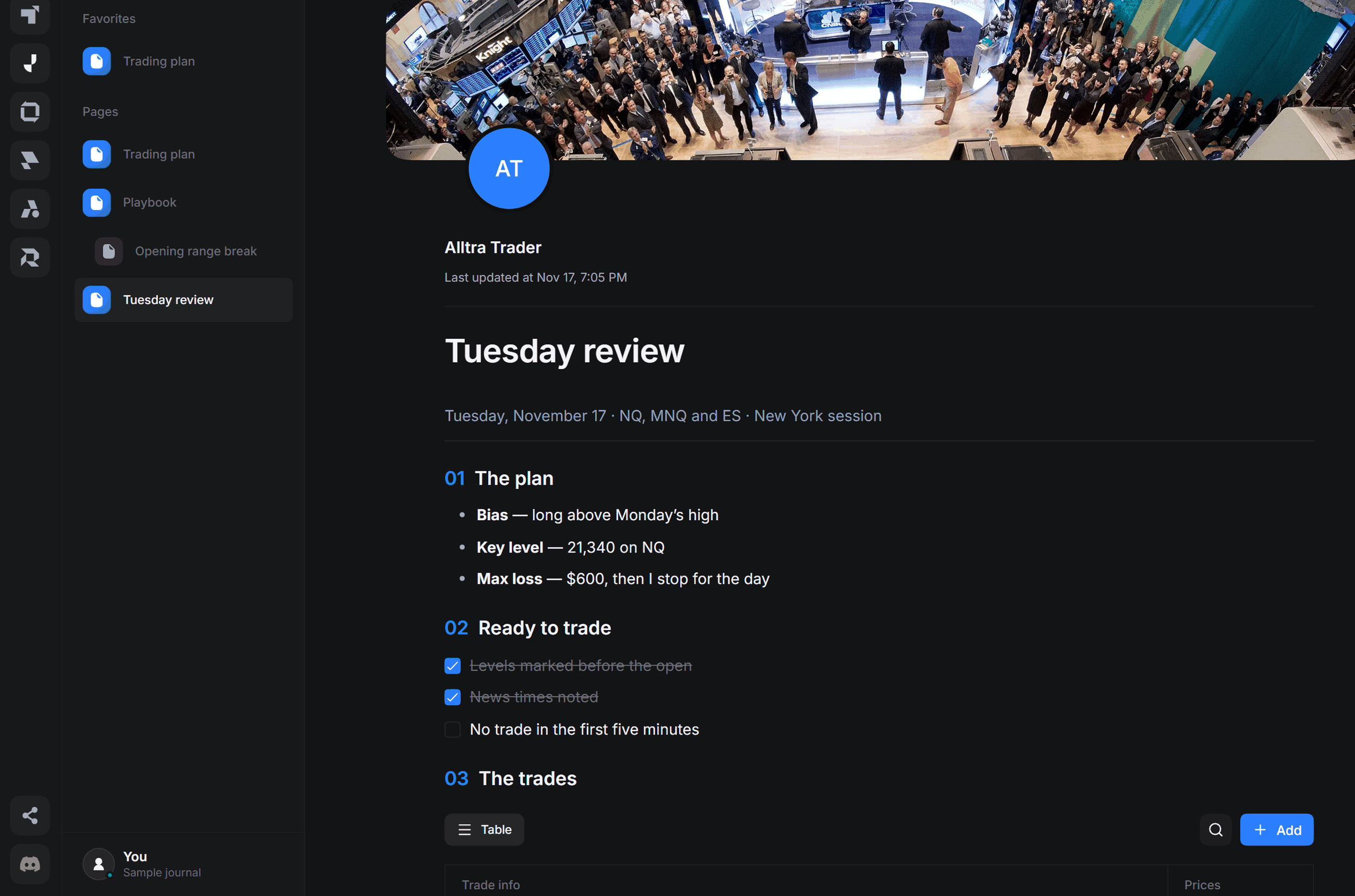
The platform connects trading data with written analysis. When trades are available in Alltra through a connected account or an import, the corresponding trading day's journal page can automatically populate with those trades.
Rather than simply recording whether a trade was profitable, traders can document why they entered, how they managed the position, what emotions influenced their decisions, and what they learned from the outcome.
Alltra Journal combines automatic daily trade records, performance information, customizable templates, trade notes, ratings, emotions, screenshots, setup documentation, tags, nested pages, and mobile-friendly editing.
Why Every Futures Trader Needs a Trading Journal
Futures markets move quickly. Traders frequently make decisions involving entries, exits, position sizing, stop placement, and trade management within a relatively short period. Without a structured trading journal, important details can easily be forgotten.
A profitable trade might have followed a well-defined strategy, or it might have resulted from an impulsive decision. Similarly, a losing trade does not necessarily indicate that the original trading setup was incorrect. A trading journal helps separate the quality of a trading decision from its financial outcome.
Identify Recurring Trading Mistakes
Recording trades consistently makes it easier to identify behavioral patterns. Traders may discover that they enter before confirmation, move stop-loss levels, overtrade after a loss, exit profitable trades too early, or trade outside their preferred market conditions.
Documenting these behaviors creates an opportunity to address them through deliberate practice and improved execution.
Understand Trading Psychology
Fear, hesitation, frustration, overconfidence, and impatience can influence how traders execute their strategies. Alltra Journal allows traders to document emotions and observations directly on individual trades, making it easier to compare psychological conditions with actual trading outcomes.
Build a Repeatable Daily Review Process
A consistent daily review creates a structured way to evaluate trading activity. Traders can revisit journal pages, examine individual trades, and compare performance across sessions instead of relying on memory.
Automatic Trade Tracking and Daily Trading Pages
One of the central features of Alltra Journal is its integration with trading activity already available in Alltra. Every trading day has its own journal page, providing a dedicated space to review the trades executed during that session.
Daily Trades Automatically Populate Your Journal
When trades are available through a connected trading account or an import, Alltra Journal can populate the corresponding daily page automatically. Each page supports up to 100 trades per day and displays important information, including individual trade records, net profit and loss, win rate, and profit factor.
The Auto Sync Table block keeps the displayed trade information populated and updated. This means traders can spend less time copying trade information and more time analyzing what happened during the session.
Keep Trade Notes Connected to Performance Data
Traders can add ratings, notes, emotions, screenshots, trading setups, and tags directly to individual trades. These details are saved on the trade itself, allowing the same information to appear in Alltra Tracker.
This connection creates a consistent workflow between quantitative trade tracking and qualitative trading analysis.
Custom Trading Journal Templates
Every trader approaches the market differently. Some prefer detailed trade-by-trade reviews, while others focus on daily performance, trading psychology, or specific strategy requirements. Alltra Journal supports customizable templates so traders can organize their journal around their preferred workflow.
Start with Ready-Made Journal Templates
The platform includes six built-in templates that provide starting points for organizing trading information. These templates help traders establish a structured journaling process without creating every section from scratch.
Create and Save Your Own Templates
Traders can create custom templates and maintain a personal library of up to 50 templates, with each template supporting up to 10 pages. Template titles can automatically include the relevant trading date. A selected template can also be configured as the starting structure for every new trading day.
Share Trading Journal Templates
Alltra Journal supports template sharing through short codes. A trader can publish a copy of a template and share its code with another user. The recipient can enter the code in the template gallery, open the shared template, and save it to their own library.
A Flexible Trading Notebook with Built-In Tools
Alltra Journal is designed to provide more than a basic text editor. Its writing environment includes a slash-command menu that gives traders access to different content blocks for organizing their journal pages.
By typing a slash, users can insert elements such as headings, checklists, tables, images, and trading-specific content blocks. These tools make it easier to create organized trading reports, document strategies, and maintain structured daily observations.
Organize Trading Notes with Nested Pages
Alltra Journal supports nested pages, allowing users to create pages inside other pages and organize them through a navigable sidebar. Pages can be dragged to reorder or move them, while individual page options include favoriting, duplicating, renaming, moving, and deleting.
Traders can also maintain up to 200 named pages alongside their daily trading pages. This structure provides room for strategy documentation, trading rules, market observations, and longer-term research.
How Alltra Journal Helps Improve Trading Performance
A trading journal becomes valuable when its information is reviewed consistently. Alltra Journal supports a practical process that connects trade execution, documentation, and performance evaluation.
Step 1: Review Your Daily Trading Activity
Open the journal page for the trading day. The associated trades and available performance information are organized within the page, providing an immediate starting point for reviewing the session.
Step 2: Document Your Trading Decisions
Add notes to individual trades to explain the reasoning behind entries and exits. Record the trading setup, market conditions, emotions, and any important observations that influenced the decision.
Step 3: Evaluate Execution Quality
Review the difference between your intended trading plan and your actual execution. Consider whether you followed your entry criteria, respected risk limits, and managed positions according to your strategy.
Step 4: Identify Patterns and Areas for Improvement
Compare your notes across multiple trading days. Look for repeated mistakes, successful execution patterns, and situations where emotional decisions influenced your trading activity.
Step 5: Build a Consistent Trading Routine
Use journal templates to establish a repeatable documentation process. With a consistent structure, reviewing daily activity becomes a regular part of trading rather than an occasional task.
Alltra Journal vs. Traditional Trading Spreadsheets
Many futures traders begin tracking performance with spreadsheets or manually maintained documents. Although spreadsheets can provide flexibility, maintaining them often requires repetitive data entry and additional organization. Alltra Journal offers a more connected approach.
- Daily trade records: often entered manually in a spreadsheet; automatically populated in Alltra Journal when trades are available in Alltra.
- Daily P&L and win rate: formulas or manual updates in a spreadsheet; displayed on the trading day page in Alltra Journal.
- Trade notes: custom spreadsheet fields; notes connected to individual trades in Alltra Journal.
- Screenshots and emotions: manual organization in a spreadsheet; supported on trade records in Alltra Journal.
- Journal templates: created manually in a spreadsheet; built-in and customizable in Alltra Journal.
- Nested pages: separate documents or tabs in a spreadsheet; a built-in page hierarchy in Alltra Journal.
- Account synchronization: depends on the spreadsheet service; journal pages are saved to the Alltra account.
The main advantage is the connection between trading records and written analysis. Instead of maintaining separate records for performance and decision-making, traders can document both within one environment.
A Free Trading Journal Without Subscription Barriers
Alltra Journal is available for free, without a subscription, trial countdown, or payment card requirement. There is no installation requirement because the journal operates through a web browser.
Journal pages automatically save as users write, and the saved information remains associated with their Alltra account. The platform also supports mobile browser access through a dedicated phone-friendly journal editor.
Alltra Journal Frequently Asked Questions
Is Alltra Journal free?
Yes. Alltra Journal is free to use, with no subscription, trial countdown, or payment card required. The platform states that its journal features are not restricted to a paid tier.
Does Alltra Journal automatically import trades?
Trades can populate journal pages once they are available in Alltra through a connected trading account or an import. Each trading day supports up to 100 trades.
Can I add screenshots and notes to individual trades?
Yes. Traders can add notes, screenshots, emotions, ratings, trading setups, and tags to individual trade records.
Does Alltra Journal support custom templates?
Yes. Users can start with six built-in templates or create their own template library with up to 50 templates. Each template can contain up to 10 pages.
Can I share my trading journal templates?
Yes. Templates can be shared through short codes, allowing other Alltra users to open and save a copy to their own template library.
Can I organize my trading notes into separate pages?
Yes. Alltra Journal supports nested pages, drag-and-drop organization, and up to 200 named pages alongside daily trading pages.
Does Alltra Journal work on mobile devices?
Yes. The journal is accessible through a mobile browser and includes a dedicated phone editor. No separate application installation is required.
What is the difference between Alltra Journal and Alltra Tracker?
Alltra Tracker focuses on calculating and displaying trading performance from individual fills. Alltra Journal focuses on documenting the decisions, observations, emotions, and context behind those trades. Information added to individual trades in the Journal is also saved on the trade itself and appears in Tracker.
Start Building a Better Trading Journal with Alltra
Consistent futures trading requires more than monitoring profit and loss. Traders also need a reliable way to document decisions, evaluate execution, understand trading psychology, and identify opportunities for improvement.
Alltra Journal brings these activities together in a dedicated trading workspace. With automatic daily trade records, customizable templates, individual trade notes, screenshots, emotional tracking, and nested pages, traders can build a more organized approach to reviewing their market activity.
Its connection with Alltra Tracker also helps bridge the gap between performance statistics and the decisions behind them.
Whether you are developing a new futures strategy, refining your execution, or looking for a better way to document daily trades, Alltra Journal provides a practical starting point.
Start using Alltra Journal for free
Product details are based on the official Alltra Journal product page. Features and product capabilities may change; consult Alltra for the latest information.